

Apache ShardingSphere 是一套开源的分布式数据库中间件解决方案组成的生态圈,它由 JDBC、Proxy 和 Sidecar(规划中)这 3 款相互独立,却又能够混合部署配合使用的产品组成。它们均提供标准化的数据分片、分布式事务和数据库治理功能,可适用于如 Java 同构、异构语言、云原生等各种多样化的应用场景。
ShardingSphere 已于 2020 年 4 月 16 日成为 Apache 软件基金会的顶级项目。
咱们话不多,接上篇,我们直接进入正题。
Atomikos 简单介绍
Atomikos(https://www.atomikos.com/),其实是一家公司的名字,提供了基于JTA规范的XA分布式事务TM的实现。其旗下最著名的产品就是事务管理器。产品分两个版本:
TransactionEssentials:开源的免费产品;
ExtremeTransactions:上商业版,需要收费。
这两个产品的关系如下图所示:
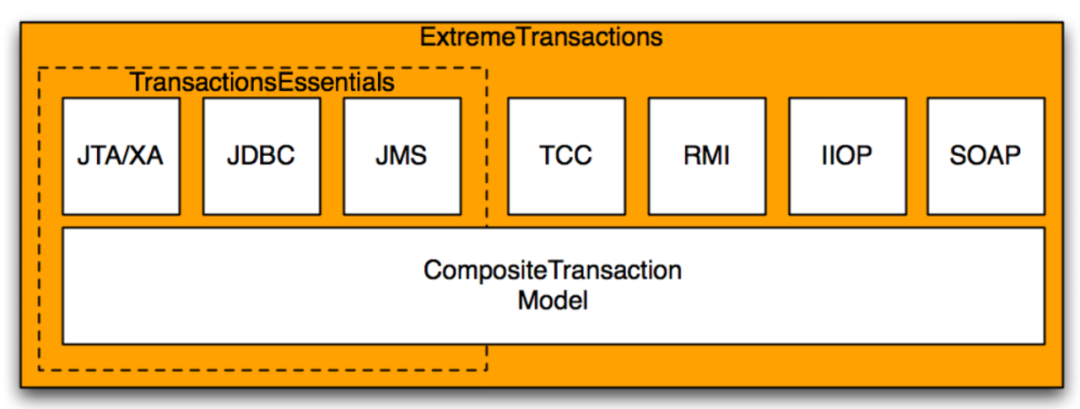
ExtremeTransactions 在 TransactionEssentials 的基础上额外提供了以下功能(重要的):
支持 TCC:这是一种柔性事务
支持通过 RMI、IIOP、SOAP 这些远程过程调用技术,进行事务传播。
事务日志云存储,云端对事务进行恢复,并且提供了完善的管理后台。
org.apache.shardingsphere.transaction.xa.XAShardingTransactionManager 详解
我们简单的来回顾下org.apache.shardingsphere.transaction.spiShardingTransactionManager
public interface ShardingTransactionManager extends AutoCloseable { /** * Initialize sharding transaction manager. * * @param databaseType database type * @param resourceDataSources resource data sources */ void init(DatabaseType databaseType, Collection<ResourceDataSource> resourceDataSources); /** * Get transaction type. * * @return transaction type */ TransactionType getTransactionType(); /** * Judge is in transaction or not. * * @return in transaction or not */ boolean isInTransaction(); /** * Get transactional connection. * * @param dataSourceName data source name * @return connection * @throws SQLException SQL exception */ Connection getConnection(String dataSourceName) throws SQLException; /** * Begin transaction. */ void begin(); /** * Commit transaction. */ void commit(); /** * Rollback transaction. */ void rollback();}我们重点县关注init方法,从它的命名,你就应该能够看出来,这是整个框架的初始化方法,让我们来看看它是如何进行初始化的。
private final Map<String, XATransactionDataSource> cachedDataSources = new HashMap<>(); private final XATransactionManager xaTransactionManager = XATransactionManagerLoader.getInstance().getTransactionManager(); @Override public void init(final DatabaseType databaseType, final Collection<ResourceDataSource> resourceDataSources) { for (ResourceDataSource each : resourceDataSources) { cachedDataSources.put(each.getOriginalName(), new XATransactionDataSource(databaseType, each.getUniqueResourceName(), each.getDataSource(), xaTransactionManager)); } xaTransactionManager.init(); }首先 SPI 的方式加载 XATransactionManager 的具体实现类,这里返回的就是
org.apache.shardingsphere.transaction.xa.atomikos.manager.AtomikosTransactionManager。我们在关注下
new XATransactionDataSource(), 进入org.apache.shardingsphere.transaction.xa.jta.datasource。XATransactionDataSource类的构造方法。
public XATransactionDataSource(final DatabaseType databaseType, final String resourceName, final DataSource dataSource, final XATransactionManager xaTransactionManager) { this.databaseType = databaseType; this.resourceName = resourceName; this.dataSource = dataSource; if (!CONTAINER_DATASOURCE_NAMES.contains(dataSource.getClass().getSimpleName())) { // 重点关注 1 ,返回了xaDatasource xaDataSource = XADataSourceFactory.build(databaseType, dataSource); this.xaTransactionManager = xaTransactionManager; // 重点关注2 注册资源 xaTransactionManager.registerRecoveryResource(resourceName, xaDataSource); } }我们重点来关注
XADataSourceFactory.build(databaseType, dataSource),从名字我们就可以看出,这应该是返回JTA规范里面的XADataSourc,在 ShardingSphere 里面很多的功能,可以从代码风格的命名上就能猜出来,这就是优雅代码(吹一波)。不多逼逼,我们进入该方法。
public final class XADataSourceFactory { public static XADataSource build(final DatabaseType databaseType, final DataSource dataSource) { return new DataSourceSwapper(XADataSourceDefinitionFactory.getXADataSourceDefinition(databaseType)).swap(dataSource); }}首先又是一个 SPI 定义的
XADataSourceDefinitionFactory,它根据不同的数据库类型,来加载不同的方言。然后我们进入swap方法。
public XADataSource swap(final DataSource dataSource) { XADataSource result = createXADataSource(); setProperties(result, getDatabaseAccessConfiguration(dataSource)); return result; }很简明,第一步创建,
XADataSource,第二步给它设置属性(包含数据的连接,用户名密码等),然后返回。返回
XATransactionDataSource类,关注xaTransactionManager.registerRecoveryResource(resourceName, xaDataSource);从名字可以看出,这是注册事务恢复资源。这个我们在事务恢复的时候详解。返回
XAShardingTransactionManager.init(),我们重点来关注:xaTransactionManager.init();,最后进入AtomikosTransactionManager.init()
public final class AtomikosTransactionManager implements XATransactionManager { private final UserTransactionManager transactionManager = new UserTransactionManager(); private final UserTransactionService userTransactionService = new UserTransactionServiceImp(); @Override public void init() { userTransactionService.init(); }}进入
UserTransactionServiceImp.init()
private void initialize() { //添加恢复资源 不用关心 for (RecoverableResource resource : resources_) { Configuration.addResource ( resource ); } for (LogAdministrator logAdministrator : logAdministrators_) { Configuration.addLogAdministrator ( logAdministrator ); } //注册插件 不用关心 for (TransactionServicePlugin nxt : tsListeners_) { Configuration.registerTransactionServicePlugin ( nxt ); } //获取配置属性 重点关心 ConfigProperties configProps = Configuration.getConfigProperties(); configProps.applyUserSpecificProperties(properties_); //进行初始化 Configuration.init(); }我们重点关注,获取配置属性。最后进入
com.atomikos.icatch.provider.imp.AssemblerImp.initializeProperties()方法
@Override public ConfigProperties initializeProperties() { //读取classpath下的默认配置transactions-defaults.properties Properties defaults = new Properties(); loadPropertiesFromClasspath(defaults, DEFAULT_PROPERTIES_FILE_NAME); //读取classpath下,transactions.properties配置,覆盖transactions-defaults.properties中相同key的值 Properties transactionsProperties = new Properties(defaults); loadPropertiesFromClasspath(transactionsProperties, TRANSACTIONS_PROPERTIES_FILE_NAME); //读取classpath下,jta.properties,覆盖transactions-defaults.properties、transactions.properties中相同key的值 Properties jtaProperties = new Properties(transactionsProperties); loadPropertiesFromClasspath(jtaProperties, JTA_PROPERTIES_FILE_NAME); //读取通过java -Dcom.atomikos.icatch.file方式指定的自定义配置文件路径,覆盖之前的同名配置 Properties customProperties = new Properties(jtaProperties); loadPropertiesFromCustomFilePath(customProperties); //最终构造一个ConfigProperties对象,来表示实际要使用的配置 Properties finalProperties = new Properties(customProperties); return new ConfigProperties(finalProperties); }接下来重点关注,
Configuration.init(), 进行初始化。
ublic static synchronized boolean init() { boolean startupInitiated = false; if (service_ == null) { startupInitiated = true; //SPI方式加载插件注册,无需过多关心 addAllTransactionServicePluginServicesFromClasspath(); ConfigProperties configProperties = getConfigProperties(); //调用插件的beforeInit方法进行初始化话,无需过多关心 notifyBeforeInit(configProperties); //进行事务日志恢复的初始化,很重要,接下来详解 assembleSystemComponents(configProperties); //进入系统注解的初始化,一般重要 initializeSystemComponents(configProperties); notifyAfterInit(); if (configProperties.getForceShutdownOnVmExit()) { addShutdownHook(new ForceShutdownHook()); } } return startupInitiated; }我们先来关注
assembleSystemComponents(configProperties);进入它,进入com.atomikos.icatch.provider.imp.AssemblerImp.assembleTransactionService()方法:
@Override public TransactionServiceProvider assembleTransactionService( ConfigProperties configProperties) { RecoveryLog recoveryLog =null; //打印日志 logProperties(configProperties.getCompletedProperties()); //生成唯一名字 String tmUniqueName = configProperties.getTmUniqueName(); long maxTimeout = configProperties.getMaxTimeout(); int maxActives = configProperties.getMaxActives(); boolean threaded2pc = configProperties.getThreaded2pc(); //SPI方式加载OltpLog ,这是最重要的扩展地方,如果用户没有SPI的方式去扩展那么就为null OltpLog oltpLog = createOltpLogFromClasspath(); if (oltpLog == null) { LOGGER.logInfo("Using default (local) logging and recovery..."); //创建事务日志存储资源 Repository repository = createRepository(configProperties); oltpLog = createOltpLog(repository); //??? Assemble recoveryLog recoveryLog = createRecoveryLog(repository); } StateRecoveryManagerImp recoveryManager = new StateRecoveryManagerImp(); recoveryManager.setOltpLog(oltpLog); //生成唯一id生成器,以后生成XID会用的到 UniqueIdMgr idMgr = new UniqueIdMgr ( tmUniqueName ); int overflow = idMgr.getMaxIdLengthInBytes() - MAX_TID_LENGTH; if ( overflow > 0 ) { // see case 73086 String msg = "Value too long : " + tmUniqueName; LOGGER.logFatal ( msg ); throw new SysException(msg); } return new TransactionServiceImp(tmUniqueName, recoveryManager, idMgr, maxTimeout, maxActives, !threaded2pc, recoveryLog); }我们重点来分析
createOltpLogFromClasspath(), 采用 SPI 的加载方式来获取,默认这里会返回null, 什么意思呢?
就是当没有扩展的时候,atomikos,会创建框架自定义的资源,来存储事务日志。
private OltpLog createOltpLogFromClasspath() { OltpLog ret = null; ServiceLoader<OltpLogFactory> loader = ServiceLoader.load(OltpLogFactory.class,Configuration.class.getClassLoader()); int i = 0; for (OltpLogFactory l : loader ) { ret = l.createOltpLog(); i++; } if (i > 1) { String msg = "More than one OltpLogFactory found in classpath - error in configuration!"; LOGGER.logFatal(msg); throw new SysException(msg); } return ret; }我们跟着进入
Repository repository = createRepository(configProperties);
private CachedRepository createCoordinatorLogEntryRepository( ConfigProperties configProperties) throws LogException { //创建内存资源存储 InMemoryRepository inMemoryCoordinatorLogEntryRepository = new InMemoryRepository(); //进行初始化 inMemoryCoordinatorLogEntryRepository.init(); //创建使用文件存储资源作为backup FileSystemRepository backupCoordinatorLogEntryRepository = new FileSystemRepository(); //进行初始化 backupCoordinatorLogEntryRepository.init(); //内存与file资源进行合并 CachedRepository repository = new CachedRepository(inMemoryCoordinatorLogEntryRepository, backupCoordinatorLogEntryRepository); repository.init(); return repository; }这里就会创建出
CachedRepository,里面包含了InMemoryRepository与FileSystemRepository回到主线
com.atomikos.icatch.config.Configuration.init(), 最后来分析下notifyAfterInit();
private static void notifyAfterInit() { //进行插件的初始化 for (TransactionServicePlugin p : tsListenersList_) { p.afterInit(); } for (LogAdministrator a : logAdministrators_) { a.registerLogControl(service_.getLogControl()); } //设置事务恢复服务,进行事务的恢复 for (RecoverableResource r : resourceList_ ) { r.setRecoveryService(recoveryService_); } }插件的初始化会进入
com.atomikos.icatch.jta.JtaTransactionServicePlugin.afterInit()
public void afterInit() { TransactionManagerImp.installTransactionManager(Configuration.getCompositeTransactionManager(), autoRegisterResources); //如果我们自定义扩展了 OltpLog ,这里就会返回null,如果是null,那么XaResourceRecoveryManager就是null RecoveryLog recoveryLog = Configuration.getRecoveryLog(); long maxTimeout = Configuration.getConfigProperties().getMaxTimeout(); if (recoveryLog != null) { XaResourceRecoveryManager.installXaResourceRecoveryManager(new DefaultXaRecoveryLog(recoveryLog, maxTimeout),Configuration.getConfigProperties().getTmUniqueName()); } }重点注意
RecoveryLog recoveryLog = Configuration.getRecoveryLog();,如果用户采用SPI的方式,扩展了com.atomikos.recovery.OltpLog,这里就会返回 null。如果是 null,则不会对XaResourceRecoveryManager进行初始化。回到
notifyAfterInit(), 我们来分析setRecoveryService。
public void setRecoveryService ( RecoveryService recoveryService ) throws ResourceException { if ( recoveryService != null ) { if ( LOGGER.isTraceEnabled() ) LOGGER.logTrace ( "Installing recovery service on resource " + getName () ); this.branchIdentifier=recoveryService.getName(); recover(); } }我们进入
recover()方法:
public void recover() { XaResourceRecoveryManager xaResourceRecoveryManager = XaResourceRecoveryManager.getInstance(); //null for LogCloud recovery if (xaResourceRecoveryManager != null) { try { xaResourceRecoveryManager.recover(getXAResource()); } catch (Exception e) { refreshXAResource(); //cf case 156968 } } }看到最关键的注释了吗,如果用户采用
SPI的方式,扩展了com.atomikos.recovery.OltpLog,那么XaResourceRecoveryManager为 null,则就会进行云端恢复,反之则进行事务恢复。事务恢复很复杂,我们会单独来讲。
到这里 atomikos 的基本的初始化已经完成。
atomikos 事务 begin 流程
我们知道,本地的事务,都会有一个 trainsaction.begin, 对应 XA 分布式事务来说也不另外,我们再把思路切换回XAShardingTransactionManager.begin(), 会调用com.atomikos.icatch.jta.TransactionManagerImp.begin()
public void begin ( int timeout ) throws NotSupportedException, SystemException { CompositeTransaction ct = null; ResumePreviousTransactionSubTxAwareParticipant resumeParticipant = null; ct = compositeTransactionManager.getCompositeTransaction(); if ( ct != null && ct.getProperty ( JTA_PROPERTY_NAME ) == null ) { LOGGER.logWarning ( "JTA: temporarily suspending incompatible transaction: " + ct.getTid() + " (will be resumed after JTA transaction ends)" ); ct = compositeTransactionManager.suspend(); resumeParticipant = new ResumePreviousTransactionSubTxAwareParticipant ( ct ); } try { //创建事务补偿点 ct = compositeTransactionManager.createCompositeTransaction ( ( ( long ) timeout ) * 1000 ); if ( resumeParticipant != null ) ct.addSubTxAwareParticipant ( resumeParticipant ); if ( ct.isRoot () && getDefaultSerial () ) ct.setSerial (); ct.setProperty ( JTA_PROPERTY_NAME , "true" ); } catch ( SysException se ) { String msg = "Error in begin()"; LOGGER.logError( msg , se ); throw new ExtendedSystemException ( msg , se ); } recreateCompositeTransactionAsJtaTransaction(ct); }这里我们主要关注
compositeTransactionManager.createCompositeTransaction(),
public CompositeTransaction createCompositeTransaction ( long timeout ) throws SysException { CompositeTransaction ct = null , ret = null; ct = getCurrentTx (); if ( ct == null ) { ret = getTransactionService().createCompositeTransaction ( timeout ); if(LOGGER.isDebugEnabled()){ LOGGER.logDebug("createCompositeTransaction ( " + timeout + " ): " + "created new ROOT transaction with id " + ret.getTid ()); } } else { if(LOGGER.isDebugEnabled()) LOGGER.logDebug("createCompositeTransaction ( " + timeout + " )"); ret = ct.createSubTransaction (); } Thread thread = Thread.currentThread (); setThreadMappings ( ret, thread ); return ret; }创建了事务补偿点,然后把他放到了用当前线程作为 key 的 Map 当中,这里思考,
为啥它不用 threadLocal。
到这里 atomikos 的事务 begin 流程已经完成。大家可能有些疑惑,begin 好像什么都没有做,XA start 也没调用?别慌,下一节继续来讲。
XATransactionDataSource getConnection() 流程
我们都知道想要执行 SQL 语句,必须要获取到数据库的 connection。让我们再回到 XAShardingTransactionManager.getConnection() 最后会调用到org.apache.shardingsphere.transaction.xa.jta.datasourceXATransactionDataSource.getConnection()
public Connection getConnection() throws SQLException, SystemException, RollbackException { //先检查是否已经有存在的connection,这一步很关心,也是XA的关键,因为XA事务,必须在同一个connection if (CONTAINER_DATASOURCE_NAMES.contains(dataSource.getClass().getSimpleName())) { return dataSource.getConnection(); } //获取数据库连接 Connection result = dataSource.getConnection(); //转成XAConnection,其实是同一个连接 XAConnection xaConnection = XAConnectionFactory.createXAConnection(databaseType, xaDataSource, result); //获取JTA事务定义接口 Transaction transaction = xaTransactionManager.getTransactionManager().getTransaction(); if (!enlistedTransactions.get().contains(transaction)) { //进行资源注册 transaction.enlistResource(new SingleXAResource(resourceName, xaConnection.getXAResource())); transaction.registerSynchronization(new Synchronization() { @Override public void beforeCompletion() { enlistedTransactions.get().remove(transaction); } @Override public void afterCompletion(final int status) { enlistedTransactions.get().clear(); } }); enlistedTransactions.get().add(transaction); } return result; }首先第一步很关心,尤其是对 shardingsphere 来说,因为在一个事务里面,会有多个 SQL 语句,打到相同的数据库,所以对相同的数据库,必须获取同一个 XAConnection,这样才能进行 XA 事务的提交与回滚。
我们接下来关心
transaction.enlistResource(new SingleXAResource(resourceName, xaConnection.getXAResource()));, 会进入com.atomikos.icatch.jta.TransactionImp.enlistResource(), 代码太长,截取一部分。
try { restx = (XAResourceTransaction) res .getResourceTransaction(this.compositeTransaction); // next, we MUST set the xa resource again, // because ONLY the instance we got as argument // is available for use now ! // older instances (set in restx from previous sibling) // have connections that may be in reuse already // ->old xares not valid except for 2pc operations restx.setXAResource(xares); restx.resume(); } catch (ResourceException re) { throw new ExtendedSystemException( "Unexpected error during enlist", re); } catch (RuntimeException e) { throw e; } addXAResourceTransaction(restx, xares);我们直接看
restx.resume();
public synchronized void resume() throws ResourceException { int flag = 0; String logFlag = ""; if (this.state.equals(TxState.LOCALLY_DONE)) {// reused instance flag = XAResource.TMJOIN; logFlag = "XAResource.TMJOIN"; } else if (!this.knownInResource) {// new instance flag = XAResource.TMNOFLAGS; logFlag = "XAResource.TMNOFLAGS"; } else throw new IllegalStateException("Wrong state for resume: " + this.state); try { if (LOGGER.isDebugEnabled()) { LOGGER.logDebug("XAResource.start ( " + this.xidToHexString + " , " + logFlag + " ) on resource " + this.resourcename + " represented by XAResource instance " + this.xaresource); } this.xaresource.start(this.xid, flag); } catch (XAException xaerr) { String msg = interpretErrorCode(this.resourcename, "resume", this.xid, xaerr.errorCode); LOGGER.logWarning(msg, xaerr); throw new ResourceException(msg, xaerr); } setState(TxState.ACTIVE); this.knownInResource = true; }哦多尅,看见了吗,各位,看见了
this.xaresource.start(this.xid, flag);了吗????,我们进去,假设我们使用的 Mysql 数据库:
public void start(Xid xid, int flags) throws XAException { StringBuilder commandBuf = new StringBuilder(300); commandBuf.append("XA START "); appendXid(commandBuf, xid); switch(flags) { case 0: break; case 2097152: commandBuf.append(" JOIN"); break; case 134217728: commandBuf.append(" RESUME"); break; default: throw new XAException(-5); } this.dispatchCommand(commandBuf.toString()); this.underlyingConnection.setInGlobalTx(true); }组装
XA start XidSQL 语句,进行执行。
到这里,我们总结下,在获取数据库连接的时候,我们执行了 XA 协议接口中的 XA start xid
atomikos 事务 commit 流程
好了,上面我们已经开启了事务,现在我们来分析下事务 commit 流程,我们再把视角切换回XAShardingTransactionManager.commit(),最后我们会进入com.atomikos.icatch.imp.CompositeTransactionImp.commit() 方法:
public void commit () throws HeurRollbackException, HeurMixedException, HeurHazardException, SysException, SecurityException, RollbackException { //首先更新下事务日志的状态 doCommit (); setSiblingInfoForIncoming1pcRequestFromRemoteClient(); if ( isRoot () ) { //真正的commit操作 coordinator.terminate ( true ); } }我们关注
coordinator.terminate ( true );
protected void terminate ( boolean commit ) throws HeurRollbackException, HeurMixedException, SysException, java.lang.SecurityException, HeurCommitException, HeurHazardException, RollbackException, IllegalStateException { synchronized ( fsm_ ) { if ( commit ) { //判断有几个参与者,如果只有一个,直接提交 if ( participants_.size () <= 1 ) { commit ( true ); } else { //否则,走XA 2阶段提交流程,先prepare, 再提交 int prepareResult = prepare (); // make sure to only do commit if NOT read only if ( prepareResult != Participant.READ_ONLY ) commit ( false ); } } else { rollback (); } } }首先会判断参与者的个数,这里我们可以理解为 MySQL 的 database 数量,如果只有一个,退化成一阶段,直接提交。
如果有多个,则走标准的 XA 二阶段提交流程。
我们来看
prepare ();流程,最后会走到com.atomikos.icatch.imp.PrepareMessage.send()--->com.atomikos.datasource.xa.XAResourceTransaction.prepare()
int ret = 0; terminateInResource(); if (TxState.ACTIVE == this.state) { // tolerate non-delisting apps/servers suspend(); } // duplicate prepares can happen for siblings in serial subtxs!!! // in that case, the second prepare just returns READONLY if (this.state == TxState.IN_DOUBT) return Participant.READ_ONLY; else if (!(this.state == TxState.LOCALLY_DONE)) throw new SysException("Wrong state for prepare: " + this.state); try { // refresh xaresource for MQSeries: seems to close XAResource after // suspend??? testOrRefreshXAResourceFor2PC(); if (LOGGER.isTraceEnabled()) { LOGGER.logTrace("About to call prepare on XAResource instance: " + this.xaresource); } ret = this.xaresource.prepare(this.xid); } catch (XAException xaerr) { String msg = interpretErrorCode(this.resourcename, "prepare", this.xid, xaerr.errorCode); if (XAException.XA_RBBASE <= xaerr.errorCode && xaerr.errorCode <= XAException.XA_RBEND) { LOGGER.logWarning(msg, xaerr); // see case 84253 throw new RollbackException(msg); } else { LOGGER.logError(msg, xaerr); throw new SysException(msg, xaerr); } } setState(TxState.IN_DOUBT); if (ret == XAResource.XA_RDONLY) { if (LOGGER.isDebugEnabled()) { LOGGER.logDebug("XAResource.prepare ( " + this.xidToHexString + " ) returning XAResource.XA_RDONLY " + "on resource " + this.resourcename + " represented by XAResource instance " + this.xaresource); } return Participant.READ_ONLY; } else { if (LOGGER.isDebugEnabled()) { LOGGER.logDebug("XAResource.prepare ( " + this.xidToHexString + " ) returning OK " + "on resource " + this.resourcename + " represented by XAResource instance " + this.xaresource); } return Participant.READ_ONLY + 1; }终于,我们看到了这么一句
ret = this.xaresource.prepare(this.xid);但是等等,我们之前不是说了,XA start xid以后要先XA end xid吗?答案就在suspend();里面。
public synchronized void suspend() throws ResourceException { // BugzID: 20545 // State may be IN_DOUBT or TERMINATED when a connection is closed AFTER // commit! // In that case, don't call END again, and also don't generate any // error! // This is required for some hibernate connection release strategies. if (this.state.equals(TxState.ACTIVE)) { try { if (LOGGER.isDebugEnabled()) { LOGGER.logDebug("XAResource.end ( " + this.xidToHexString + " , XAResource.TMSUCCESS ) on resource " + this.resourcename + " represented by XAResource instance " + this.xaresource); } //执行了 xa end 语句 this.xaresource.end(this.xid, XAResource.TMSUCCESS); } catch (XAException xaerr) { String msg = interpretErrorCode(this.resourcename, "end", this.xid, xaerr.errorCode); if (LOGGER.isTraceEnabled()) LOGGER.logTrace(msg, xaerr); // don't throw: fix for case 102827 } setState(TxState.LOCALLY_DONE); } }到了这里,我们已经执行了 XA start xid -> XA end xid --> XA prepare xid, 接下来就是最后一步 commit
我们再回到
terminate(false)方法,来看 commit()流程。其实和 prepare 流程一样,最后会走到com.atomikos.datasource.xa.XAResourceTransaction.commit()。commit 执行完,数据提交
//繁杂代码过多,就显示核心的this.xaresource.commit(this.xid, onePhase);思考:这里的参与者提交是在一个循环里面,一个一个提交的,如果之前的提交了,后面的参与者提交的时候,挂了,就会造成数据的不一致性。
Atomikos rollback() 流程
上面我们已经分析了 commit 流程,其实 rollback 流程和 commit 流程一样,我们在把目光切换回 org.apache.shardingsphere.transaction.xa.XAShardingTransactionManager.rollback() ,最后会执行到com.atomikos.icatch.imp.CompositeTransactionImp.rollback()。
public void rollback () throws IllegalStateException, SysException { //清空资源,更新事务日志状态等 doRollback (); if ( isRoot () ) { try { coordinator.terminate ( false ); } catch ( Exception e ) { throw new SysException ( "Unexpected error in rollback: " + e.getMessage (), e ); } } }重点关注
coordinator.terminate ( false );,这个和 commit 流程是一样的,只不过在 commit 流程里面,参数传的是 true。
protected void terminate ( boolean commit ) throws HeurRollbackException, HeurMixedException, SysException, java.lang.SecurityException, HeurCommitException, HeurHazardException, RollbackException, IllegalStateException { synchronized ( fsm_ ) { if ( commit ) { if ( participants_.size () <= 1 ) { commit ( true ); } else { int prepareResult = prepare (); // make sure to only do commit if NOT read only if ( prepareResult != Participant.READ_ONLY ) commit ( false ); } } else { //如果是false,走的是rollback rollback (); } } }我们重点关注
rollback(),最后会走到com.atomikos.datasource.xa.XAResourceTransaction.rollback()。
public synchronized void rollback() throws HeurCommitException, HeurMixedException, HeurHazardException, SysException { terminateInResource(); if (rollbackShouldDoNothing()) { return; } if (this.state.equals(TxState.TERMINATED)) { return; } if (this.state.equals(TxState.HEUR_MIXED)) throw new HeurMixedException(); if (this.state.equals(TxState.HEUR_COMMITTED)) throw new HeurCommitException(); if (this.xaresource == null) { throw new HeurHazardException("XAResourceTransaction " + getXid() + ": no XAResource to rollback?"); } try { if (this.state.equals(TxState.ACTIVE)) { // first suspend xid suspend(); } // refresh xaresource for MQSeries: seems to close XAResource after // suspend??? testOrRefreshXAResourceFor2PC(); if (LOGGER.isDebugEnabled()) { LOGGER.logDebug("XAResource.rollback ( " + this.xidToHexString + " ) " + "on resource " + this.resourcename + " represented by XAResource instance " + this.xaresource); } this.xaresource.rollback(this.xid);先在
supend()方法里面执行了XA end xid语句, 接下来执行this.xaresource.rollback(this.xid);进行数据的回滚。
Atomikos 事务恢复流程
在说,事务恢复流程之前,我们来讨论下,会啥会出现事务恢复?,XA 2 阶段提交协议不是强一致性的吗?。要解答这个问题,我们就要来看看 XA 二阶段协议有什么问题?
问题一 :单点故障
由于协调者的重要性,一旦协调者 TM 发生故障。参与者 RM 会一直阻塞下去。尤其在第二阶段,协调者发生故障,那么所有的参与者还都处于锁定事务资源的状态中,而无法继续完成事务操作。(如果是协调者挂掉,可以重新选举一个协调者,但是无法解决因为协调者宕机导致的参与者处于阻塞状态的问题)
问题二 :数据不一致
数据不一致。在二阶段提交的阶段二中,当协调者向参与者发送 commit 请求之后,发生了局部网络异常或者在发送 commit 请求过程中协调者发生了故障,这回导致只有一部分参与者接受到了 commit 请求。而在这部分参与者接到 commit 请求之后就会执行 commit 操作。但是其他部分未接到 commit 请求的机器则无法执行事务提交。于是整个分布式系统便出现了数据不一致性的现象。
如何解决?
解决的方案简单,就是我们在事务的操作的每一步,我们都需要对事务状态的日志进行人为的记录,我们可以把日志记录存储在我们想存储的地方,可以是本地存储,也可以中心化的存储。atomikos 的开源版本,我们之前也分析了,它是使用内存 + file 的方式,存储在本地,这样的话,如果在一个集群系统里面,如果有节点宕机,日志又存储在本地,所以事务不能及时的恢复(需要重启服务)。
Atomikos 多场景下事务恢复。
Atomikos 提供了二种方式,来应对不同场景下的异常情况。
场景一:服务节点不宕机,因为其他的原因,产生需要事务恢复的情况。这个时候才要定时任务进行恢复。
具体的代码
com.atomikos.icatch.imp.TransactionServiceImp.init()方法,会初始化一个定时任务,进行事务的恢复。
public synchronized void init ( Properties properties ) throws SysException { shutdownInProgress_ = false; control_ = new com.atomikos.icatch.admin.imp.LogControlImp ( (AdminLog) this.recoveryLog ); ConfigProperties configProperties = new ConfigProperties(properties); long recoveryDelay = configProperties.getRecoveryDelay(); recoveryTimer = new PooledAlarmTimer(recoveryDelay); recoveryTimer.addAlarmTimerListener(new AlarmTimerListener() { @Override public void alarm(AlarmTimer timer) { //进行事务恢复 performRecovery(); } }); TaskManager.SINGLETON.executeTask(recoveryTimer); initialized_ = true; }最终会进入
com.atomikos.datasource.xa.XATransactionalResource.recover()方法。
public void recover() { XaResourceRecoveryManager xaResourceRecoveryManager = XaResourceRecoveryManager.getInstance(); if (xaResourceRecoveryManager != null) { //null for LogCloud recovery try { xaResourceRecoveryManager.recover(getXAResource()); } catch (Exception e) { refreshXAResource(); //cf case 156968 } } }场景二: 当服务节点宕机重启动过程中进行事务的恢复。具体实现在
com.atomikos.datasource.xa.XATransactionalResource.setRecoveryService()方法里面
@Override public void setRecoveryService ( RecoveryService recoveryService ) throws ResourceException { if ( recoveryService != null ) { if ( LOGGER.isTraceEnabled() ) LOGGER.logTrace ( "Installing recovery service on resource " + getName () ); this.branchIdentifier=recoveryService.getName(); //进行事务恢复 recover(); } }com.atomikos.datasource.xa.XATransactionalResource.recover() 流程详解。
public void recover(XAResource xaResource) throws XAException { // 根据XA recovery 协议获取 xid List<XID> xidsToRecover = retrievePreparedXidsFromXaResource(xaResource); Collection<XID> xidsToCommit; try { // xid 与日志记录的xid进行匹配 xidsToCommit = retrieveExpiredCommittingXidsFromLog(); for (XID xid : xidsToRecover) { if (xidsToCommit.contains(xid)) { //执行 XA commit xid 进行提交 replayCommit(xid, xaResource); } else { attemptPresumedAbort(xid, xaResource); } } } catch (LogException couldNotRetrieveCommittingXids) { LOGGER.logWarning("Transient error while recovering - will retry later...", couldNotRetrieveCommittingXids); } }我们来看一下如何根据
XA recovery 协议获取RM端存储的xid。进入方法retrievePreparedXidsFromXaResource(xaResource), 最后进入com.atomikos.datasource.xa.RecoveryScan.recoverXids()方法。
public static List<XID> recoverXids(XAResource xaResource, XidSelector selector) throws XAException { List<XID> ret = new ArrayList<XID>(); boolean done = false; int flags = XAResource.TMSTARTRSCAN; Xid[] xidsFromLastScan = null; List<XID> allRecoveredXidsSoFar = new ArrayList<XID>(); do { xidsFromLastScan = xaResource.recover(flags); flags = XAResource.TMNOFLAGS; done = (xidsFromLastScan == null || xidsFromLastScan.length == 0); if (!done) { // TEMPTATIVELY SET done TO TRUE // TO TOLERATE ORACLE 8.1.7 INFINITE // LOOP (ALWAYS RETURNS SAME RECOVER // SET). IF A NEW SET OF XIDS IS RETURNED // THEN done WILL BE RESET TO FALSE done = true; for ( int i = 0; i < xidsFromLastScan.length; i++ ) { XID xid = new XID ( xidsFromLastScan[i] ); // our own XID implements equals and hashCode properly if (!allRecoveredXidsSoFar.contains(xid)) { // a new xid is returned -> we can not be in a recovery loop -> go on allRecoveredXidsSoFar.add(xid); done = false; if (selector.selects(xid)) { ret.add(xid); } } } } } while (!done); return ret; }我们重点关注
xidsFromLastScan = xaResource.recover(flags);这个方法,如果我们使用 MySQL,那么久会进入 MysqlXAConnection.recover()方法。执行XA recovery xid语句来获取 xid
protected static Xid[] recover(Connection c, int flag) throws XAException { /* * The XA RECOVER statement returns information for those XA transactions on the MySQL server that are in the PREPARED state. (See Section 13.4.7.2, ???XA * Transaction States???.) The output includes a row for each such XA transaction on the server, regardless of which client started it. * * XA RECOVER output rows look like this (for an example xid value consisting of the parts 'abc', 'def', and 7): * * mysql> XA RECOVER; * +----------+--------------+--------------+--------+ * | formatID | gtrid_length | bqual_length | data | * +----------+--------------+--------------+--------+ * | 7 | 3 | 3 | abcdef | * +----------+--------------+--------------+--------+ * * The output columns have the following meanings: * * formatID is the formatID part of the transaction xid * gtrid_length is the length in bytes of the gtrid part of the xid * bqual_length is the length in bytes of the bqual part of the xid * data is the concatenation of the gtrid and bqual parts of the xid */ boolean startRscan = ((flag & TMSTARTRSCAN) > 0); boolean endRscan = ((flag & TMENDRSCAN) > 0); if (!startRscan && !endRscan && flag != TMNOFLAGS) { throw new MysqlXAException(XAException.XAER_INVAL, Messages.getString("MysqlXAConnection.001"), null); } // // We return all recovered XIDs at once, so if not TMSTARTRSCAN, return no new XIDs // // We don't attempt to maintain state to check for TMNOFLAGS "outside" of a scan // if (!startRscan) { return new Xid[0]; } ResultSet rs = null; Statement stmt = null; List<MysqlXid> recoveredXidList = new ArrayList<MysqlXid>(); try { // TODO: Cache this for lifetime of XAConnection stmt = c.createStatement(); rs = stmt.executeQuery("XA RECOVER"); while (rs.next()) { final int formatId = rs.getInt(1); int gtridLength = rs.getInt(2); int bqualLength = rs.getInt(3); byte[] gtridAndBqual = rs.getBytes(4); final byte[] gtrid = new byte[gtridLength]; final byte[] bqual = new byte[bqualLength]; if (gtridAndBqual.length != (gtridLength + bqualLength)) { throw new MysqlXAException(XAException.XA_RBPROTO, Messages.getString("MysqlXAConnection.002"), null); } System.arraycopy(gtridAndBqual, 0, gtrid, 0, gtridLength); System.arraycopy(gtridAndBqual, gtridLength, bqual, 0, bqualLength); recoveredXidList.add(new MysqlXid(gtrid, bqual, formatId)); } } catch (SQLException sqlEx) { throw mapXAExceptionFromSQLException(sqlEx); } finally { if (rs != null) { try { rs.close(); } catch (SQLException sqlEx) { throw mapXAExceptionFromSQLException(sqlEx); } } if (stmt != null) { try { stmt.close(); } catch (SQLException sqlEx) { throw mapXAExceptionFromSQLException(sqlEx); } } } int numXids = recoveredXidList.size(); Xid[] asXids = new Xid[numXids]; Object[] asObjects = recoveredXidList.toArray(); for (int i = 0; i < numXids; i++) { asXids[i] = (Xid) asObjects[i]; } return asXids; }这里要注意如果Mysql的版本 <5.7.7 ,则不会有任何数据,在以后的版本中Mysql进行了修复,因此如果我们想要使用MySQL充当RM,版本必须 >= 5.7.7,原因是:
MySQL 5.6 版本在客户端退出的时候,自动把已经 prepare 的事务回滚了,那么 MySQL 为什么要这样做?这主要取决于 MySQL 的内部实现,MySQL 5.7 以前的版本,对于 prepare 的事务,MySQL 是不会记录 binlog 的(官方说是减少 fsync,起到了优化的作用)。只有当分布式事务提交的时候才会把前面的操作写入 binlog 信息,所以对于 binlog 来说,分布式事务与普通的事务没有区别,而 prepare 以前的操作信息都保存在连接的 IO_CACHE 中,如果这个时候客户端退出了,以前的 binlog 信息都会被丢失,再次重连后允许提交的话,会造成 Binlog 丢失,从而造成主从数据的不一致,所以官方在客户端退出的时候直接把已经 prepare 的事务都回滚了!
回到主线,假设我们获取到需要进行事务恢复的 XID,再从自己记录的事务日志里面获取 XID,如果前者包含在后者之中,则进行 commit,否则进行 rollback.
List<XID> xidsToRecover = retrievePreparedXidsFromXaResource(xaResource); Collection<XID> xidsToCommit; try { xidsToCommit = retrieveExpiredCommittingXidsFromLog(); for (XID xid : xidsToRecover) { if (xidsToCommit.contains(xid)) { replayCommit(xid, xaResource); } else { attemptPresumedAbort(xid, xaResource); } } } catch (LogException couldNotRetrieveCommittingXids) { LOGGER.logWarning("Transient error while recovering - will retry later...", couldNotRetrieveCommittingXids); }replayCommit 方法如下:
private void replayCommit(XID xid, XAResource xaResource) { if (LOGGER.isDebugEnabled()) LOGGER.logDebug("Replaying commit of xid: " + xid); try { xaResource.commit(xid, false); log.terminated(xid); } catch (XAException e) { if (alreadyHeuristicallyTerminatedByResource(e)) { handleHeuristicTerminationByResource(xid, xaResource, e, true); } else if (xidTerminatedInResourceByConcurrentCommit(e)) { log.terminated(xid); } else { LOGGER.logWarning("Transient error while replaying commit - will retry later...", e); } } }attemptPresumedAbort(xid, xaResource); 方法如下:
private void attemptPresumedAbort(XID xid, XAResource xaResource) { try { log.presumedAborting(xid); if (LOGGER.isDebugEnabled()) LOGGER.logDebug("Presumed abort of xid: " + xid); try { xaResource.rollback(xid); log.terminated(xid); } catch (XAException e) { if (alreadyHeuristicallyTerminatedByResource(e)) { handleHeuristicTerminationByResource(xid, xaResource, e, false); } else if (xidTerminatedInResourceByConcurrentRollback(e)) { log.terminated(xid); } else { LOGGER.logWarning("Unexpected exception during recovery - ignoring to retry later...", e); } } } catch (IllegalStateException presumedAbortNotAllowedInCurrentLogState) { // ignore to retry later if necessary } catch (LogException logWriteException) { LOGGER.logWarning("log write failed for Xid: "+xid+", ignoring to retry later", logWriteException); } }文章到此,已经写的很长很多了,我们分析了 ShardingSphere 对于 XA 方案,提供了一套 SPI 解决方案,对 Atomikos 进行了整合,也分析了 Atomikos 初始化流程,开始事务流程,获取连接流程,提交事务流程,回滚事务流程,事务恢复流程。
希望对大家理解 XA 的原理有所帮助。
作者介绍:
肖宇,Apache ShardingSphere Committer,开源 hmily 分布式事务框架作者,开源 soul 网关作者,热爱开源,追求写优雅代码。目前就职于京东数科,参与 ShardingSphere 的开源建设,以及分布式数据库的研发工作。
本文转载自公众号 ShardingSphere 官微(ID:Sharding-Sphere)。
原文链接:


