
2026 年,智能体将在企业级应用中取得哪些实质性突破?点击下载《2026 年 AI 与数据发展预测》白皮书,获悉专家一手前瞻,抢先拥抱新的工作方式!
我们是如何走到这一步的
过去三年使用 AI 编程工具的经历,呈现出一条清晰的演进路径:每一个阶段,都解决了前一个阶段无法解决的问题。
Prompt engineering 专注于写出完美的指令。你会不断调整措辞、添加示例、指定输出格式。一次请求对应一次响应。如果输出不对,就重写提示词;
Context engineering 解决了仅靠提示词无法克服的局限:模型掌握的信息不够。于是有了 RAG 流水线、文件引用、语义搜索和对话历史。人们逐渐意识到,一个普通的提示词搭配强大的上下文,效果往往优于一个精心打磨却没有上下文的提示词;
Harness engineering 将关注点转向了基础设施,包括工具调用、多步骤链路和智能体框架。模型不再只是一个文本生成器,而是成为系统中的行动者,能够执行操作并观察操作结果;
Loop Engineering 则是下一阶段。你不再设计一次次独立的交互,而是开始设计能够自主运行的系统,让它持续经历“行动、观察、推理、重复”的循环,直到某个客观目标通过验证。
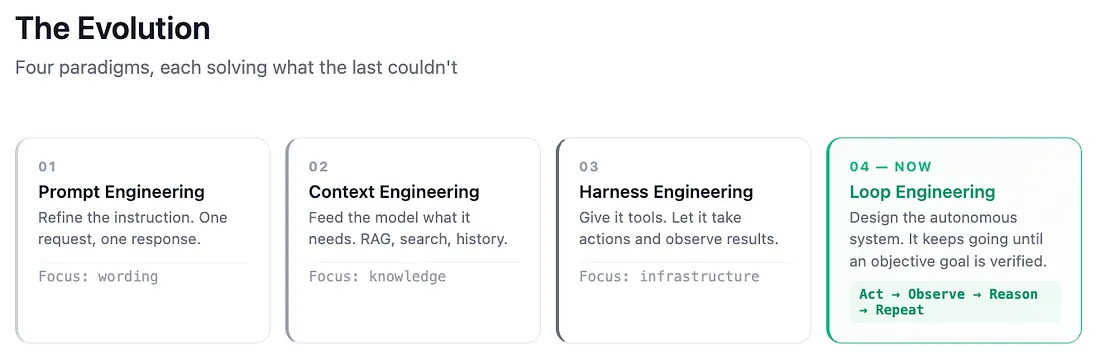
这种差异非常重要。你不再是在设计 AI 要做什么,而是在设计一个系统,让 AI 持续运行,直到工作真正完成。
定义循环工程
一个循环工程系统需要具备四项结构性要求:
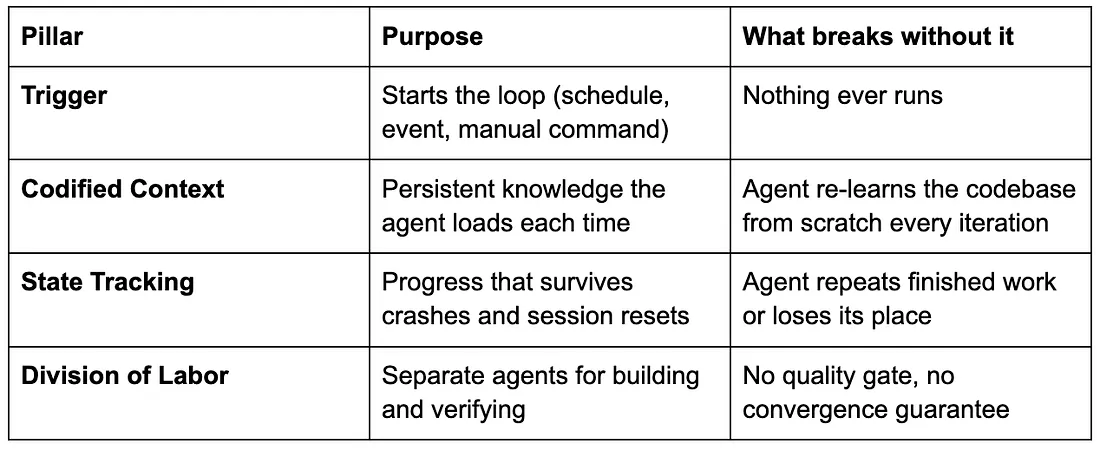
循环不会因为模型认为自己已经完成任务而停止。只有当客观检查通过时,它才会停止,例如测试全部通过、代码检查无误、部署成功。这一区别正是循环工程的核心。
CoCo 如何支持循环工程
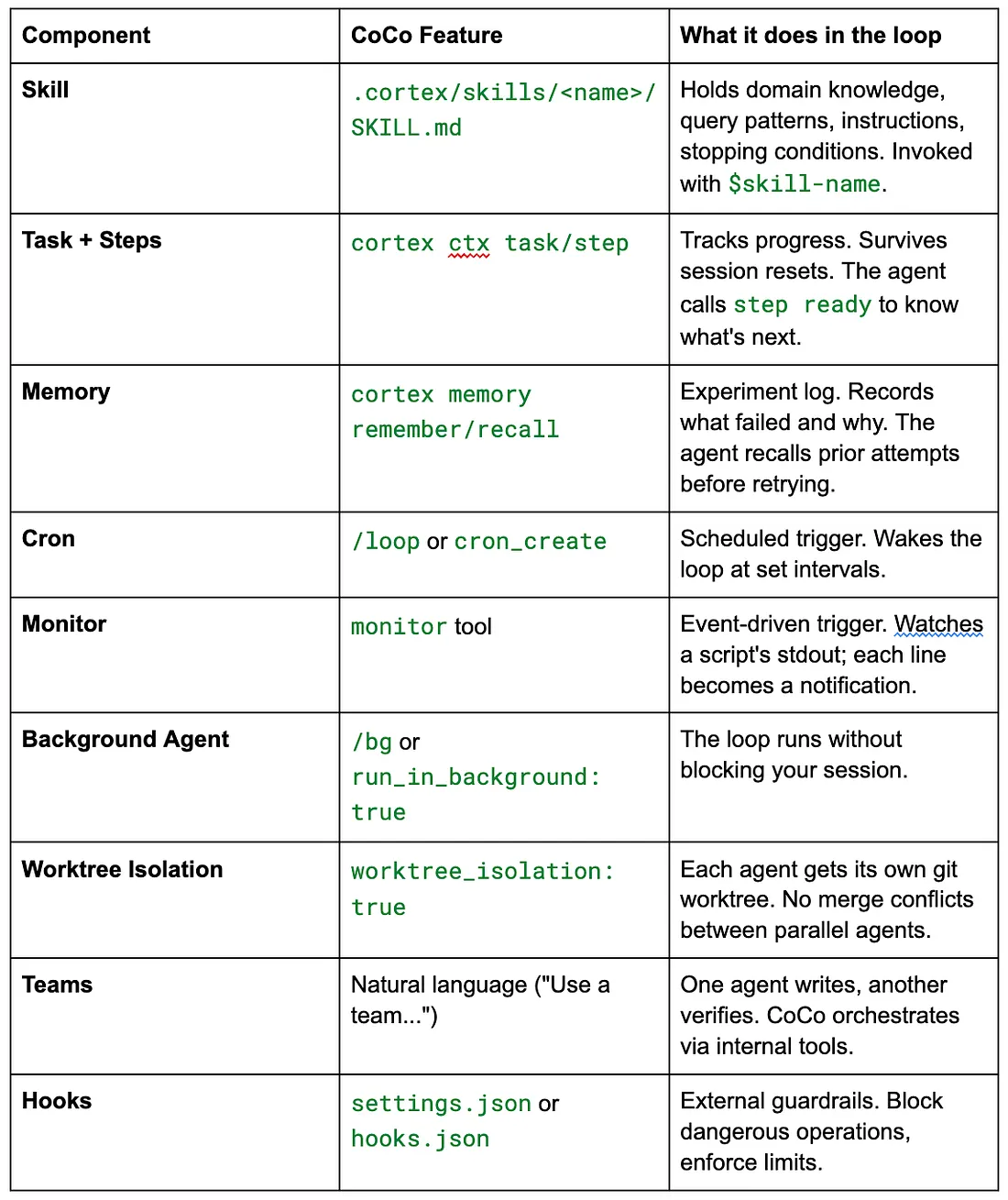
CoCo 为每一项支柱都提供了原生基础能力。其架构如下:
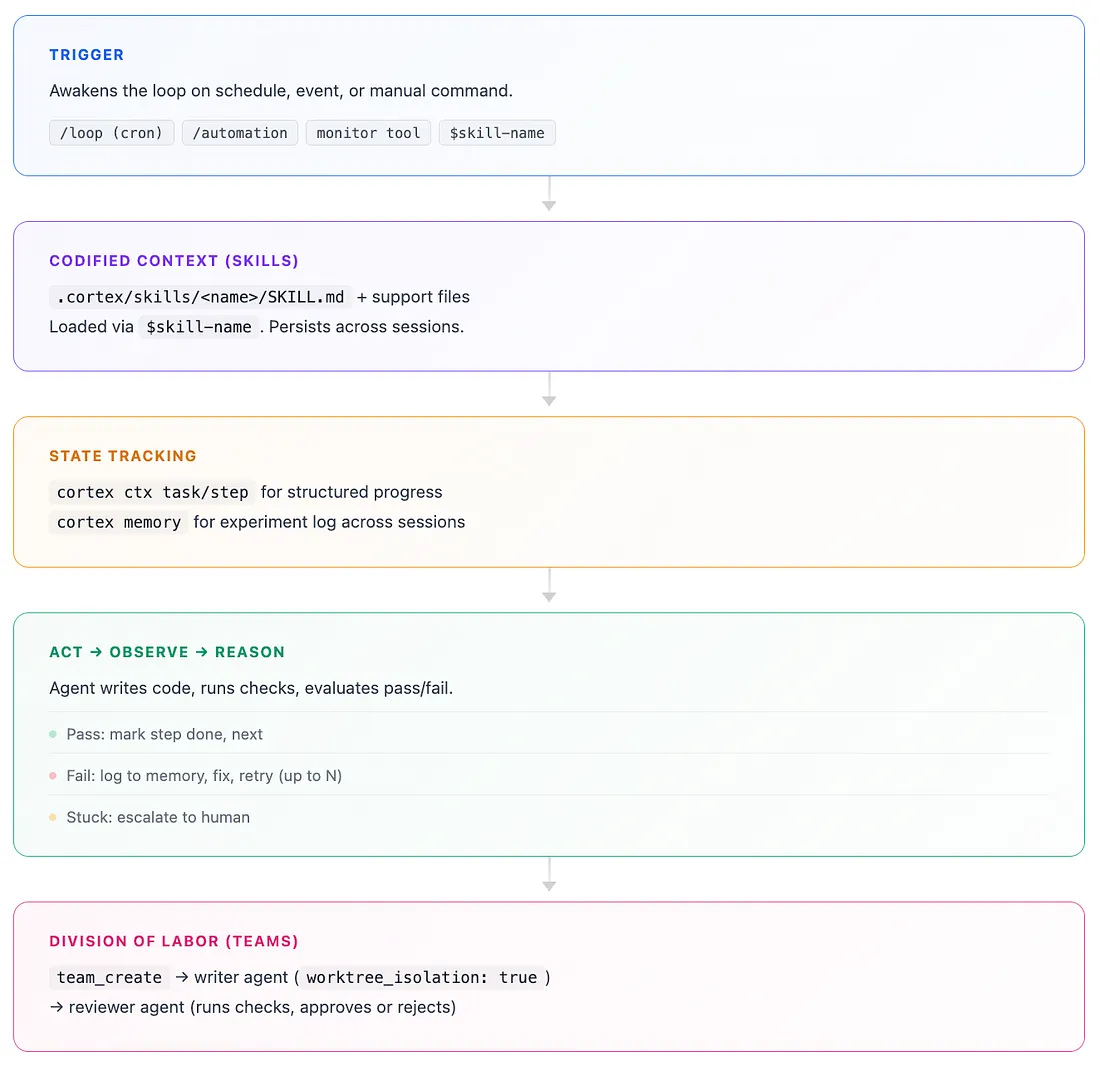
相关组件包括:
一个真实案例:构建股票分析应用
我采用这种方法,从一个空目录开始,构建了一个多页面 Streamlit 分析应用。下面是整个过程。
定义目标
我编写了一份 APP_SPEC.md,其中列出了循环可以通过程序检查的验收标准:
## Acceptance Criteria- [ ] Streamlit app runs locally without errors- [ ] Snowflake connection works (queries return data)- [ ] Page 1: Market Overview, Dow 30 heatmap, sector performance- [ ] Page 2: Stock Deep Dive, candlestick chart, volume, moving averages- [ ] Page 3: Comparison, normalized returns, correlation matrix- [ ] Page 4: Macro Overlay, stock vs CPI dual-axis chart- [ ] Passes ruff check (no lint errors)- [ ] Passes streamlit run - server.headless true (no crash)- [ ] Deploys to Snowflake successfully每一项标准都对应一个可以自动执行的检查。“完成”是一个布尔值,而不是主观判断。
编写技能
技能文件会告诉智能体有哪些数据、如何查询这些数据,以及出现问题时应该如何处理:
# Skill: Stock App Builder Loop## Data Context- Stock Prices: FINANCE__ECONOMICS.CYBERSYN.STOCK_PRICE_TIMESERIES- Variables: pre-market_open, post-market_close, all-day_high, all-day_low, nasdaq_volume- Range: 2018 to present, 23,062 tickers- Companies: DB_STOCK.CURATED.COMPANIES (TICKER, COMPANY_NAME)## Loop Instructions1. Run `cortex memory recall "stock-app-builder"` for prior state.2. Run `cortex ctx step ready` to find next uncompleted step.3. Implement the next failing criterion.4. Run the relevant check.5. Pass → `cortex ctx step done <id>`, move to next.6. Fail → `cortex memory remember "stock-app-builder: <error>"`, fix and retry.7. Max 5 retries per step. If stuck, ask user.我通过 $stock-app-builder 调用这个技能。CoCo 会加载它,并自主运行。
cortex ctx task add "Build stock analytics Streamlit app"cortex ctx task start task-ff742cc1cortex ctx step add "Scaffold: snowflake.yml, environment.yml, streamlit_app.py"cortex ctx step add "Implement sidebar: date range + ticker autocomplete"cortex ctx step add "Page 1: Market Overview"cortex ctx step add "Page 2: Stock Deep Dive"cortex ctx step add "Page 3: Comparison"cortex ctx step add "Page 4: Macro Overlay"cortex ctx step add "Pass lint: ruff check ."cortex ctx step add "Pass runtime: streamlit run - server.headless true"cortex ctx step add "Deploy: snow streamlit deploy"每完成一个步骤,cortex ctx step ready 就会返回下一个步骤。即使构建过程中会话意外中断,智能体也能从上次停止的位置继续执行。
观察循环运行
我输入了 $stock-app-builder。智能体开始构建所有项目文件,并在执行过程中逐一将步骤标记为完成。随后,它进入了验证关卡。
代码检查:
$ ruff check .All checks passed!运行检查:
$ streamlit run streamlit_app.py - server.headless true→ HTTP 200 on localhost:8599部署:
PUT file://streamlit_app.py @DB_STOCK.PUBLIC.STOCK_ANALYTICS_STAGE/CREATE OR REPLACE STREAMLIT DB_STOCK.PUBLIC.STOCK_ANALYTICS_APP …→ "Streamlit STOCK_ANALYTICS_APP successfully created."十个步骤全部通过验证,任务自主完成。
修复循环的实际运行过程
后来,我又添加了一项功能:
$stock-app-builder "Add top gainers/losers page"智能体创建了 pages/5_Top_Movers.py,随后运行代码检查。检查失败,原因是存在一个未使用的导入,以及一个没有占位符的 f-string。智能体识别出这两个问题,完成修复,重新运行代码检查并通过,随后执行运行检查,返回 HTTP 200,最后完成部署。整个过程不需要人工干预。
这一过程体现了最核心的模式:构建、检查、失败、分析失败原因、修复、重新检查、通过,然后继续下一步。
添加技术指标
$stock-app-builder "Add RSI and MACD indicators to deep dive"智能体创建任务、添加步骤,实现了 14 日 RSI,以及 MACD(12/26/9)指标和相应的 Plotly 图表,随后运行代码检查并一次通过,再执行运行检查,最后完成部署。总计五个步骤,零次失败。
工作流程概述
定义目标 →
APP_SPEC.md(可验证的检查项);创建技能 →
.cortex/skills/(持久化上下文);/SKILL.md 设置状态 →
cortex ctx task和步骤(进度跟踪);调用循环 →
$skill-name(或使用/loop定时执行,使用/bg后台执行);循环执行 → 行动 → 检查 → 通过或失败 → 下一步或重试;
迭代技能 → 当循环持续在同一类问题上失败时,更新技能。
我学到的几点经验
从低成本操作开始。 每次循环迭代的第一个动作都应该足够轻量:当前是否还有工作需要完成?如果
cortex ctx step ready没有返回任何内容,就直接退出。不要浪费 token,最后才发现任务队列原本就是空的;
修复技能,而不是提示词。 当循环在某一类问题上失败时,人们的本能反应往往是重写提示词。不要这样做。应该在
SKILL.md中补充缺失的处理模式,或者添加一个辅助脚本。技能能够跨会话持续存在,提示词则不能;
为循环提供干净的信号。 不要把长达 500 行的原始堆栈跟踪直接反馈给循环。应该在技能中要求智能体提取出错行、文件名和错误信息。信号越干净,循环收敛得越快;
将实验记录到记忆中。 使用
cortex memory remember “Attempt 2: null check added, tests pass locally but fail in CI”,可以避免循环重复尝试同一种方案;
设置明确的硬性限制。 每个循环都需要设置上限,包括每个步骤的最大重试次数、总迭代次数,以及转交给人工处理的触发点。如果没有下限约束,你可能会得到一个成本高昂、无限运行,却始终无法产出结果的循环;
使用客观检查,而不是自我评估。 智能体说“看起来是正确的”,不能作为停止条件。
ruff check . → All checks passed!可以作为停止条件。curl localhost:8599 → 200也可以作为停止条件。
未来将走向何处
循环工程最有意思的一点是,你会将时间投入到系统设计中,而不是一条条编写单独的指令。你需要定义“完成”究竟意味着什么,将领域知识一次性编码进系统,设置验证检查,然后让循环自行运行。
最终,提示词会缩短为一行:
$stock-app-builder其余的一切,都由结构承担。
附录:构建全部内容的一条提示词
下面是一条完整的提示词。它由 CoCo 在本文所述的构建会话中自行编写,可以从零触发整套循环工程工作流。
将它交给 CoCo 后,CoCo 会搭建项目结构、创建技能、设置任务跟踪、构建所有页面、运行全部检查并完成部署。除非某项检查的失败次数超出重试预算,否则整个过程不需要任何额外输入。
Build me a stock analytics Streamlit app using loop engineering. Follow these steps exactly:## Step 1: Scaffold the Project```bashmkdir stock-analytics-app && cd stock-analytics-appcortex ctx init```## Step 2: Create APP_SPEC.md (Verifiable Goal)```markdown# Stock Analytics App — Acceptance Criteria## Data SourceDatabase: DB_STOCK.CURATEDKey tables:- DAILY_STOCK_PRICES (8.3M rows) — OHLCV by ticker × date- COMPANIES_ENRICHED — company reference- DOW30_REFERENCE — Dow 30 components + sectors- MACRO_ECONOMIC_INDICATORS — macro time series- SECURITIES — security metadata## App Requirements- [ ] Streamlit app runs locally without errors- [ ] Snowflake connection works (queries return data)- [ ] Page 1: Market Overview — Dow 30 heatmap (daily % change), sector performance bar chart- [ ] Page 2: Stock Deep Dive — ticker selector, candlestick chart, volume overlay, moving averages (20/50/200 day)- [ ] Page 3: Comparison — multi-ticker line chart (normalized returns), correlation matrix- [ ] Page 4: Macro Overlay — plot stock vs. macro indicator (e.g., S&P vs. CPI/unemployment)- [ ] Sidebar: date range picker, ticker search/autocomplete- [ ] Passes ruff check (no lint errors)- [ ] Passes streamlit run --server.headless true (no runtime crash)- [ ] Deploys to Snowflake: snow streamlit deploy succeeds## Tech- Streamlit 1.35+- snowflake-snowpark-python- plotly for charts- Target: DB_STOCK schema, container runtime```## Step 3: Create the Builder SkillCreate `.cortex/skills/stock-app-builder/SKILL.md`:```markdown# Skill: Stock Analytics App Builder## When to UseBuilding or iterating on the DB_STOCK analytics Streamlit app.## Data Context- Prices: DB_STOCK.CURATED.DAILY_STOCK_PRICES (DATE, TICKER, OPEN/CLOSE/HIGH/LOW_PRICE, VOLUME)- Companies: DB_STOCK.CURATED.COMPANIES_ENRICHED (TICKER, COMPANY_NAME, PRIMARY_EXCHANGE_NAME)- Dow 30: DB_STOCK.CURATED.DOW30_REFERENCE (TICKER, COMPANY_NAME, SECTOR, INDUSTRY)- Macro: DB_STOCK.CURATED.MACRO_ECONOMIC_INDICATORS (DATE, VARIABLE_NAME, VALUE, GEO_NAME)- Securities: DB_STOCK.CURATED.SECURITIES (TICKER, ASSET_CLASS, SECURITY_NAME)## Loop Instructions1. Read APP_SPEC.md for acceptance criteria.2. Run `cortex memory recall "stock-app-builder"` for prior state.3. Run `cortex ctx step ready` to find next uncompleted step.4. Implement the next failing criterion.5. Run the relevant check: - Code: `ruff check .` - Runtime: `timeout 30 streamlit run streamlit_app.py --server.headless true` - Deploy: `snow streamlit deploy --replace`6. Pass → `cortex ctx step done <id>`, move to next.7. Fail → `cortex memory remember "stock-app-builder: <error>"`, fix and retry.8. Max 5 retries per step. If stuck, ask user.## Query Patterns-- Daily returns for heatmapSELECT TICKER, DATE, (CLOSE_PRICE - LAG(CLOSE_PRICE) OVER (PARTITION BY TICKER ORDER BY DATE)) / LAG(CLOSE_PRICE) OVER (PARTITION BY TICKER ORDER BY DATE) AS DAILY_RETURNFROM DB_STOCK.CURATED.DAILY_STOCK_PRICESWHERE TICKER IN (SELECT TICKER FROM DB_STOCK.CURATED.DOW30_REFERENCE) AND DATE >= DATEADD('month', -1, CURRENT_DATE());-- Moving averagesSELECT DATE, TICKER, CLOSE_PRICE, AVG(CLOSE_PRICE) OVER (PARTITION BY TICKER ORDER BY DATE ROWS 19 PRECEDING) AS MA_20, AVG(CLOSE_PRICE) OVER (PARTITION BY TICKER ORDER BY DATE ROWS 49 PRECEDING) AS MA_50, AVG(CLOSE_PRICE) OVER (PARTITION BY TICKER ORDER BY DATE ROWS 199 PRECEDING) AS MA_200FROM DB_STOCK.CURATED.DAILY_STOCK_PRICESWHERE TICKER = :selected_ticker AND DATE >= DATEADD('year', -2, CURRENT_DATE());```## File Structure```stock-analytics-app/├── APP_SPEC.md├── snowflake.yml├── environment.yml├── streamlit_app.py (main + sidebar)├── pages/│ ├── 1_Market_Overview.py│ ├── 2_Stock_Deep_Dive.py│ ├── 3_Comparison.py│ └── 4_Macro_Overlay.py└── .cortex/skills/stock-app-builder/SKILL.md```## Step 4: Set Up Task + Steps```bashcortex ctx task add "Build stock analytics Streamlit app"cortex ctx task start task-001cortex ctx step add "Scaffold: snowflake.yml, environment.yml, streamlit_app.py, pages/" -t task-001cortex ctx step add "Implement sidebar: date range picker + ticker autocomplete" -t task-001cortex ctx step add "Page 1: Market Overview — Dow 30 heatmap + sector bar chart" -t task-001cortex ctx step add "Page 2: Stock Deep Dive — candlestick + volume + moving averages" -t task-001cortex ctx step add "Page 3: Comparison — normalized returns + correlation matrix" -t task-001cortex ctx step add "Page 4: Macro Overlay — stock vs macro indicator chart" -t task-001cortex ctx step add "Pass lint: ruff check ." -t task-001cortex ctx step add "Pass runtime: streamlit run --server.headless true" -t task-001cortex ctx step add "Deploy: snow streamlit deploy" -t task-001```## Step 5: Launch the Loop**Option A: Interactive (watch it build)**```$stock-app-builder```**Option B: Background (keep working on other things)**```/bg Build the stock analytics app using $stock-app-builder. Complete all steps in order. Deploy when all checks pass.```**Option C: Incremental (one step per session)**```/loop→ cron: "0 9 * * *"→ prompt: "$stock-app-builder — complete the next ready step, then stop"→ recurring: true```## Step 6: Writer/Reviewer for QualityTell CoCo in natural language: "Use a team. Writer builds each page, reviewer runs the checks."CoCo internally orchestrates this using its agent tools (you don't write this syntax yourself):```# What CoCo does behind the scenes:team_create: "stock-app"# Writer — builds code in isolated worktreetask(subagent_type: "general-purpose", team_name: "stock-app", name: "builder", worktree_isolation: true, prompt: "Load $stock-app-builder. Build the next uncompleted page. Query DB_STOCK.CURATED tables. Use plotly for all charts. Commit after each page passes lint.")# Reviewer — validates after builder finishestask(subagent_type: "general-purpose", team_name: "stock-app", name: "reviewer", prompt: "Review builder's code: 1. ruff check . 2. streamlit run --server.headless true (timeout 30s) 3. Verify SQL queries return non-empty data 4. If fail, create fix task with exact error. 5. If pass, mark step done.")```## Step 7: Stopping ConditionsIn the skill, these are already encoded. Additionally:```bash# Global guardrail — no single command runs more than 3 minutes/settings → bashMaxTimeoutMs: 180000``````json// hooks.json — prevent accidental writes to production tables// Hook receives tool_input via stdin as JSON; exit code 2 blocks the operation.{ "hooks": { "PreToolUse": [ { "matcher": "sql_execute", "hooks": [ { "type": "command", "command": "./block-writes.sh", "timeout": 5 } ] } ] }}```Where `block-writes.sh` reads stdin and blocks DML:```bash#!/bin/bashINPUT=$(cat)SQL=$(echo "$INPUT" | jq -r '.tool_input.sql // empty')if echo "$SQL" | grep -qi 'INSERT\|UPDATE\|DELETE\|DROP'; then echo "Blocked: read-only on DB_STOCK" >&2 exit 2fi```## Step 8: Post-Deploy Monitoring LoopAfter the app is deployed:```/loop→ cron: "0 */6 * * *" (every 6 hours)→ prompt: "Check stock app health: 1. SHOW STREAMLITS LIKE 'stock_analytics' IN SCHEMA DB_STOCK.PUBLIC 2. If status != ACTIVE, diagnose and alert me. 3. Query DAILY_STOCK_PRICES for latest date — if >2 days stale, alert. Otherwise exit immediately."→ recurring: true```---### What the Loop Looks Like in Practice```[Cron fires at 9:00 AM] → Agent loads $stock-app-builder skill → Recalls memory: "stock-app-builder: Page 2 candlestick done, starting Page 3" → Checks: cortex ctx step ready → "Page 3: Comparison" → Writes pages/3_Comparison.py → Queries DB_STOCK.CURATED.DAILY_STOCK_PRICES for multi-ticker data → Builds normalized returns chart + correlation heatmap → Runs ruff check . → passes → Runs streamlit locally → passes → cortex ctx step done step-005 → Checks next: "Page 4: Macro Overlay" → [budget reached for this session] → exits → Memory: "stock-app-builder: Pages 1-3 complete, Page 4 next"[Next day, cron fires again] → Picks up at Page 4...```APP_SPEC.md defines "done." The skill encodes how to iterate. The ctx steps track progress across sessions. Memory preserves experiment results. The loop runs until all acceptance criteria pass.原文地址:https://medium.com/snowflake/loop-engineering-in-snowflake-coco-b450648431c9

点击链接立即报名注册:Ascent - Snowflake Platform Training - China,更多 Snowflake 精彩活动请关注专区。


