

在 Android UI 遍历测试中,除传统的基于 monkey 的随机性测试外,基于模型的测试在测试覆盖率和可回溯性上表现更好,是目前热门的研究方向。在基于模型的测试中,对 UI 页面的定义和动作事件的筛选是十分重要而基础的工作。本文将介绍 UI 页面定义和动作事件筛选的具体方法。
技术实现
本项目使用 python。我们可以使用 UI Automator 来获取 UI 界面的层次树信息。
View Tree
UI 页面其实是一种树状结构的数据,称作 view tree,其节点是每一个子 view。每个子 view 一般包含'resource_id'、'scrollable'、'clickable'、'bounds'等信息,我们可以充分利用这些信息,来对页面进行定义以及动作事件的筛选。
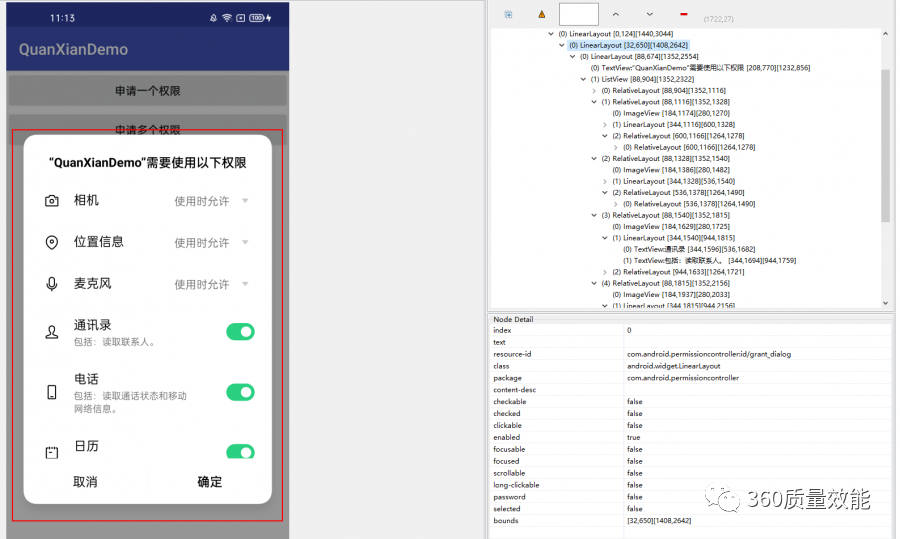
为了便于操作,先将 view tree 树结构转成 list 列表形式,并保存子 view 的 index 索引等信息。
def get_view_list(view_tree): view_tree['parent'] = -1 view_list = [] view_tree_to_list(0, view_tree, view_list) self.last_acc_event['view_list'] = view_list return view_listdef view_tree_to_list(index, view_tree, view_list): tree_id = len(view_list) view_tree['temp_id'] = tree_id bounds = [[-1, -1], [-1, -1]] bounds[0][0] = view_tree['bounds'][0] bounds[0][1] = view_tree['bounds'][1] bounds[1][0] = view_tree['bounds'][2] bounds[1][1] = view_tree['bounds'][3] width = bounds[1][0] - bounds[0][0] height = bounds[1][1] - bounds[0][1] view_tree['size'] = "%d*%d" % (width, height) view_tree['index'] = index view_tree['bounds'] = bounds view_list.append(view_tree) children_ids = [] for item in range(len(view_tree['children'])): child_tree = view_tree['children'][item] child_tree['parent'] = tree_id view_tree_to_list(item, child_tree, view_list) children_ids.append(child_tree['temp_id']) view_tree['children'] = children_ids新页面的定义
由于 App 里有 feed 页等可无限刷新的页面,这就需要对页面进行定义区分,将类似的页面归为一类,避免 UI 遍历过程陷入无限循环的状态。这里,我们对页面有效信息提取成文本,并哈希成字符串作为该页面的唯一标识符。具体地,我们提取了每一个子 view 的'class'、'clickable'、'checked'、'scrollable'、'long-clickable'、'text'这些信息,将 UI 页面所有的子 view 信息组成文本,并用 md5 哈希成字符串。
def get_state_str(view_list): state_str_raw = get_state_str_raw(view_list) return md5(state_str_raw)def get_state_str_raw(view_list): view_signatures = set() for view in view_list: view_signature = get_view_signature(view) if view_signature: view_signatures.add(view_signature) return "%s{%s}" % (self.foreground_activity, ",".join(sorted(view_signatures)))def get_view_signature(view_dict): view_text = view_dict['text'] if view_text is None or len(view_text) > 50: view_text = "None" signature = "[class]%s[text]%s[%s,%s,%s,%s]" % \ (view_dict['class'], view_text, view_dict['clickable'], view_dict['checked'], view_dict['scrollable'], view_dict['long-clickable'] ) return signature动作事件筛选
我们遍历所有的子 view,首先去掉'resource_id'为'android:id/navigationBarBackground'、'android:id/statusBarBackground'的导航栏的 view,这在遍历测试中是不需要的。但有的 app,它的导航栏 view 的'resource_id'不是这个,那就需要新加入过滤的内容,或者直接通过顶栏的坐标过滤掉导航栏。
过滤完系统的 view 事件之后,我们继续筛选,这里我们选取了'scrollable'或者'clickable'为 true 的子 view。当然我们还可以筛选'enabled'、'focusable'等为 true 的子 view 事件,可以根据项目实际需要自行定义选择。
def get_possible_input(view_list): possible_events = [] enabled_view_ids = [] touch_exclude_view_ids = set() for view_dict in view_list: if view_dict['enabled'] and \ view_dict['resource_id'] not in \ ['android:id/navigationBarBackground', 'android:id/statusBarBackground']: enabled_view_ids.append(view_dict['temp_id']) for view_id in enabled_view_ids: if view_list[view_id]['scrollable']: possible_events.append(ScrollEvent(view=views_list[view_id], direction="UP")) possible_events.append(ScrollEvent(view=views_list[view_id], direction="DOWN")) possible_events.append(ScrollEvent(view=views_list[view_id], direction="LEFT")) possible_events.append(ScrollEvent(view=views_list[view_id], direction="RIGHT")) elif view_list[view_id]['clickable']: possible_events.append(TouchEvent(view=views_list[view_id])) touch_exclude_view_ids.add(view_id) # elif views_list[view_id]['enabled'] and \ # views_list[view_id]['focusable']: # possible_events.append(TouchEvent(view=views_list[view_id])) return possible_events我们如果想优先把'scrollable'的事件放在前面,可以分开筛选。有的时候向下的 ScrollEvent 事件是不必要的,我们也可以注释掉。
for view_id in enabled_view_ids: if views_list[view_id]['scrollable']: possible_events.append(ScrollEvent(view=views_list[view_id], direction="UP")) # possible_events.append(ScrollEvent(view=views_list[view_id], direction="DOWN")) possible_events.append(ScrollEvent(view=views_list[view_id], direction="LEFT")) possible_events.append(ScrollEvent(view=views_list[view_id], direction="RIGHT"))for view_id in enabled_view_ids: if views_list[view_id]['clickable']: possible_events.append(TouchEvent(view=views_list[view_id])) touch_exclude_view_ids.add(view_id)另外,我们还可以过滤一些不必要的子 view 事件。比如,有的子 view 的坐标 bounds 超出了 UI 界面,这些界面外子 view 是不需要去测试遍历的。还有的子 view 的 bounds 会挤在一小块的像素内,这些也是不必要的。这里,我们设置如果 bounds 上下边界坐标差小于 5 时,就过滤掉。
def filter_possible_input(possible_events,origin_dim=[1080, 1920]): filter_events = [] for event in possible_events: # 过滤坐标为负的值 bounds = event.view["bounds"] bounds = [bounds[0][0], bounds[0][1], bounds[1][0], bounds[1][1]] x_min = max(0, bounds[0]) y_min = max(0, bounds[1]) x_max = min(origin_dim[0], bounds[2]) y_max = min(origin_dim[1], bounds[3]) if x_min >= x_max or y_min >= y_max: continue # 更新bounds坐标点 event.view["bounds"] = [[x_min,y_min],[x_max,y_max]] # 过滤小于5个像素的event if (y_max-y_min) < 5: pass else: filter_events.append(event) return filter_events总结
通过对页面的定义和动作事件的筛选,我们可以将不同的页面进行区分,相似的页面归为一类,筛选有效的 event 事件。在此基础上,我们可以构建图模型,将测试任务变为对有向图的遍历问题,在图模型上应用不同的算法,比如深度优先遍历、启发式搜索、深度学习或者强化学习算法等,对 App 进行充分的遍历测试。
本文转载自:360 技术(ID:qihoo_tech)
原文链接:UI遍历中页面定义和动作事件筛选方法


