一、鸿蒙 7 到底变了什么:从"人找 App"到"意图即服务"
过去四十年的操作系统,核心逻辑没变过:你打开 App,找到功能,点击操作。鸿蒙 7 把这个逻辑彻底推翻了。
华为官方对 HarmonyOS 7 的定义是:全面构建 Agent 亲和的系统架构。翻译成技术语言就是三件事:
Agent 亲和系统架构:操作系统从底层为 AI 智能体运行做准备,系统能力全面 Skill 化
HMAF 2.0(鸿蒙智能体框架 2.0):复杂任务成功率>90%,首次开放 GUI 操控能力,开放 20+系统级 AI 能力
小艺全面进化:从语音助手蜕变为"系统智慧大脑",接入 2100+系统能力、500+精选 Skill、2000+鸿蒙智能体,日活 1.8 亿
关键数据:
这意味着:用户说"帮我规划周末去杭州的行程",小艺不再返回一个搜索链接,而是自主拆解任务——查天气、看日程、订酒店、规划路线、写入日历,全程跨多个 App 和系统服务自动完成。
二、HMAF 2.0 架构拆解:五层 Agent 亲和体系
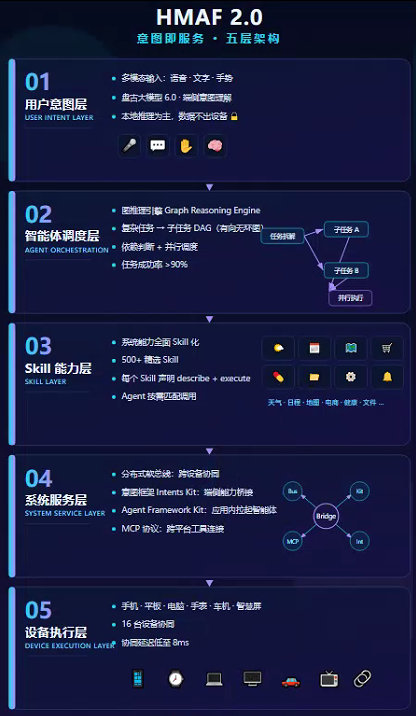
HMAF 2.0 的核心设计理念是"意图即服务"——用户表达需求,系统理解意图,自动调度 Skill 完成任务。整个架构分五层:
用户意图层:支持语音、文字、手势多模态输入,盘古大模型 6.0 在端侧完成意图理解,大部分推理在本地完成,数据不出设备。
智能体调度层:核心是图推理引擎(Graph Reasoning Engine),负责将复杂任务自动拆解为子任务 DAG(有向无环图),判断依赖关系并并行调度。这是 HMAF 2.0 成功率>90%的关键。
Skill 能力层:系统能力全面 Skill 化——天气、日程、地图、电商、健康、文件等 500+精选 Skill,每个 Skill 声明自己能干什么(describe)和怎么干(execute),Agent 按需匹配调用。
系统服务层:分布式软总线负责跨设备协同,意图框架(Intents Kit)负责端侧能力桥接,Agent Framework Kit 负责应用内拉起智能体,MCP 协议负责跨平台工具连接。
设备执行层:手机、平板、电脑、手表、车机、智慧屏等 16 台设备协同,延迟低至 8ms。
三、Skill 开发实战:五步流程
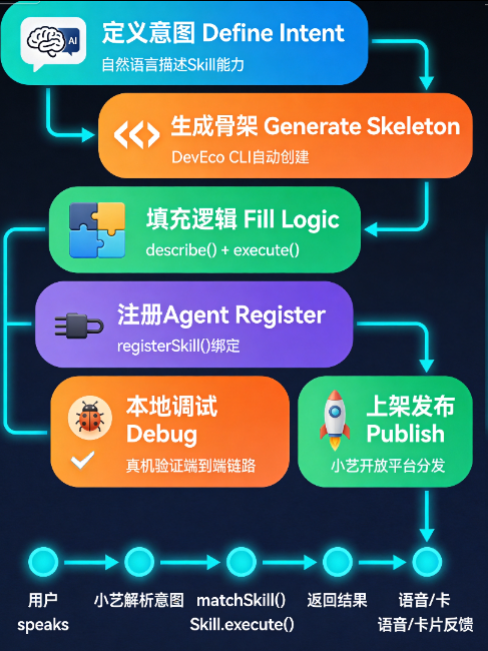
HarmonyOS 7 的 HMAF 提供了一套 Skill 开发流程。核心思路:先用自然语言描述 Skill 能力,框架自动生成骨架代码,开发者填充业务逻辑。
开发路径:
描述意图 → 生成Skill骨架 → 填充业务逻辑 → 注册到Agent → 本地调试 → 上架发布
复制代码
用 DevEco CLI 创建 Agent 模块并添加 Skill:
# 创建agent模块deveco create --type module --name agent --template agent
# 添加天气查询Skilldeveco agent add-skill --name weather_query --module agent
复制代码
CLI 会在agent/src/main/ets/skills/下生成WeatherQuerySkill.ets骨架文件。
3.1 定义一个天气查询 Skill
Skill 的核心就两件事:describe()声明能力,execute()执行逻辑。
// agent/src/main/ets/skills/WeatherQuerySkill.etsimport { Skill, SkillContext, SkillResult, SkillParameter } from '@kit.AgentKit'import { http } from '@kit.NetworkKit'
// 天气数据结构interface WeatherData {  location: string  temperature: number  condition: string  humidity: number  forecast: ForecastItem[]}
interface ForecastItem {  date: string  high: number  low: number  condition: string}
// 天气服务封装class WeatherService {  private baseUrl: string = 'https://api.example.com/weather'
  async fetchWeather(location: string): Promise<WeatherData> {    const httpRequest = http.createHttp()    try {      const response = await httpRequest.request(        `${this.baseUrl}?city=${encodeURIComponent(location)}`,        {          method: http.RequestMethod.GET,          header: { 'Content-Type': 'application/json' },          connectTimeout: 5000,          readTimeout: 5000        }      )      if (response.responseCode === http.ResponseCode.OK) {        return JSON.parse(response.result as string) as WeatherData      }      throw new Error(`请求失败,状态码: ${response.responseCode}`)    } finally {      httpRequest.destroy()    }  }}
// Skill本体export class WeatherQuerySkill extends Skill {  private weatherService: WeatherService = new WeatherService()
  // 声明能力:告诉框架"我叫什么、需要什么参数"  describe(): SkillParameter {    return {      name: 'weather_query',      description: '查询指定城市的实时天气信息',      parameters: {        location: {          type: 'string',          description: '城市名称,如"北京""上海"',          required: true        },        date: {          type: 'string',          description: '查询日期,默认今天。格式:YYYY-MM-DD',          required: false        }      }    }  }
  // 执行逻辑:框架匹配到这个Skill后调用  async execute(context: SkillContext): Promise<SkillResult> {    const location = context.params.location as string    if (!location) {      return SkillResult.error('你还没说要查哪个城市的天气呢')    }
    try {      const data = await this.weatherService.fetchWeather(location)      const today = data.forecast[0]      return SkillResult.success({        location: data.location,        temperature: data.temperature,        condition: data.condition,        humidity: data.humidity,        summary: `${data.location}今天${data.condition},` +          `气温${today.low}~${today.high}°C,` +          `湿度${data.humidity}%`      })    } catch (e) {      console.error(`查询 ${location} 天气出错:`, e)      return SkillResult.error(`查询${location}的天气失败了,稍后再试试`)    }  }}
复制代码
3.2 把 Skill 注册到 Agent
Skill 写好了,需要告诉 Agent"我有这个本事":
// agent/src/main/ets/SmartLifeAgent.etsimport { Agent, AgentConfig, AgentRequest, AgentResponse } from '@kit.AgentKit'import { WeatherQuerySkill } from './skills/WeatherQuerySkill'
export class SmartLifeAgent extends Agent {  onCreate(config: AgentConfig): void {    // 注册Skill    this.registerSkill(new WeatherQuerySkill())    // 可以继续注册更多Skill    // this.registerSkill(new CalendarSkill())    // this.registerSkill(new NavigationSkill())  }}
复制代码
整个调用链路是:用户说"北京天气怎么样" → 小艺解析意图 → matchSkill()匹配到WeatherQuerySkill → 调用execute() → 返回格式化结果 → 语音或卡片展示。
开发者只需要关心两件事:describe()写对参数,execute()写好逻辑。 意图匹配、任务拆解、多 Skill 调度全部由 HMAF 2.0 框架自动完成。
四、应用端接入:Agent Framework Kit
Skill 和 Agent 在小艺开放平台创建完成后,需要在鸿蒙 App 中通过 Agent Framework Kit 接入。核心是两个组件:FunctionComponent(UI 入口)和FunctionController(控制器)。
4.1 完整集成示例
// entry/src/main/ets/pages/SmartAssistantPage.etsimport { BusinessError } from '@kit.BasicServicesKit'import { common } from '@kit.AbilityKit'import {  FunctionComponent,  FunctionController,  ButtonType} from '@kit.AgentFrameworkKit'import { hilog } from '@kit.PerformanceAnalysisKit'
@Entry@Componentstruct SmartAssistantPage {  @State isAgentReady: boolean = false  private agentId: string = 'agentproxy_smart_life_2026'  private controller: FunctionController = new FunctionController()
  async aboutToAppear() {    // 1. 检查智能体是否可用    try {      let context = this.getUIContext()?.getHostContext() as common.UIAbilityContext      this.isAgentReady = await this.controller.isAgentSupport(context, this.agentId)    } catch (err) {      hilog.error(0x0001, 'AgentDemo', `智能体检查失败: ${err}`)    }
    // 2. 监听对话框生命周期    this.controller.on('agentDialogOpened', () => {      hilog.info(0x0001, 'AgentDemo', '智能体对话框已打开')      // 暂停背景音乐等操作    })    this.controller.on('agentDialogClosed', () => {      hilog.info(0x0001, 'AgentDemo', '智能体对话框已关闭')      // 恢复现场、刷新数据    })  }
  aboutToDisappear() {    this.controller.off('agentDialogOpened')    this.controller.off('agentDialogClosed')  }
  build() {    Column({ space: 16 }) {      if (this.isAgentReady) {        // 智能体可用:展示自定义样式入口        FunctionComponent({          agentId: this.agentId,          onError: (err: BusinessError) => {            hilog.error(0x0001, 'AgentDemo',              `拉起智能体失败: ${err.code} - ${err.message}`)          },          options: {            title: 'AI 生活助手',            queryText: '帮我看看今天有什么安排',            buttonType: ButtonType.CAPSULE,            isShowShadow: true,            titleFontSize: 16,            iconSize: 20,            iconColors: ['#00d4ff'],            titleColors: ['#00d4ff', '#00ff88'],            backgroundColor: '#0a1628'          },          controller: this.controller        })      } else {        // 降级方案        Text('AI助手暂不可用,请稍后重试')          .fontSize(14)          .fontColor('#999999')      }    }    .width('100%')    .height('100%')    .justifyContent(FlexAlign.Center)    .alignItems(HorizontalAlign.Center)  }}
复制代码
4.2 关键 API 说明
五、三类插件体系:端插件、云插件、MCP
鸿蒙智能体的能力扩展有三条路径,对应不同场景:
5.1 端插件(Intents Kit 桥接)
数据不出设备,零网络延迟,响应<100ms。适合隐私敏感场景。
// module.json5 中定义意图能力{ "module": { "intents": [{ "action": "action.monitor.queryStatus", "entities": ["entity.server"], "uris": [{ "scheme": "monitor", "host": "server", "path": "status" }] }] }}
复制代码
端插件调用链路只有 2 跳:用户 → 小艺 → Intents Kit → App本地处理 → 返回。
5.2 云插件(HTTP 对接后端)
最灵活的扩展方式,通过 HTTP 协议对接你的服务器。适合需要调用外部 API 的场景。
关键约束:超时时间必须<2200ms,需要提供清晰的工具描述帮助 LLM 理解插件能力。
5.3 MCP 协议(跨平台工具连接)
MCP(Model Context Protocol)是 Anthropic 发起的开放协议,定义了 AI 模型如何标准地调用外部工具。鸿蒙通过dart_mcp等库支持 MCP,实现"一句话调度全屋鸿蒙设备"的 AI 体验。
三类插件的选择原则:能端侧就不上云,需要外部数据走云插件,跨平台互联走 MCP。
六、统一服务能力模型:跨设备路由
在多设备协同场景下,需要统一抽象服务能力,根据设备上下文动态路由:
// 统一服务能力模型type DeviceType = 'phone' | 'tablet' | 'pc' | 'watch' | 'car'
interface ServiceCapability {  id: string  name: string  scene: string  requiredPermissions: string[]  supportedDevices: DeviceType[]  riskLevel: 'low' | 'medium' | 'high'  fallback: string}
// 路线规划能力定义const routePlanning: ServiceCapability = {  id: 'travel.route.plan',  name: '路线规划',  scene: '出行',  requiredPermissions: ['location'],  supportedDevices: ['phone', 'tablet', 'car'],  riskLevel: 'medium',  fallback: '展示手动输入地址页面'}
// 设备上下文路由interface DeviceContext {  device: DeviceType  networkAvailable: boolean  locationGranted: boolean  batteryLow: boolean}
function selectRouteTarget(ctx: DeviceContext): string {  if (!ctx.networkAvailable) return 'offlineFallback'  if (ctx.device === 'car' && ctx.locationGranted) return 'carNavigation'  if (ctx.device === 'watch') return 'briefReminder'  return 'phoneRoutePage'}
复制代码
这套模型让同一套业务规则在不同设备上自动适配:手机做身份认证和输入,平板做阅读编辑,手表做提醒,车机做导航——用户感知到的是任务连续,而不是设备切换。
七、开发者入局建议
先做 Skill,再做 App。鸿蒙 7 的入口不再只是 App 图标,Skill 可以负一屏、语音、搜索、卡片等多渠道触达用户。500+精选 Skill 的竞争窗口还在,天工计划单个智能体最高 75 万元激励。
端侧优先。盘古大模型 6.0 端侧运行+端插件数据不出设备,是鸿蒙区别于其他平台的核心差异点。隐私合规+低延迟,一举两得。
关注 MCP 生态。MCP 协议正在成为 AI Agent 连接外部工具的标准。鸿蒙+MCP 的组合意味着你的 App 可以同时被小艺和任何支持 MCP 的 AI 平台调用。
降级设计不能省。定位失败允许手动输入,车机不可用手机继续导航,Agent 理解失败展示候选意图。智能生态不能只设计成功路径。
八、总结
鸿蒙 7 不是一次普通的版本升级,而是操作系统范式的根本转变。从"App 的容器"到"意图的执行者",从"人找应用"到"意图即服务"——这七个字可能是鸿蒙 7 留给行业最深远的一句话。
对开发者而言,现在进入鸿蒙 Agent 生态的时机很好:HMAF 2.0 框架成熟、Skill 开发降低门槛、Agent Framework Kit 让接入极简、天工计划提供真金白银的激励。更重要的是,这是一个中国开发者有机会参与构建的、从底层到生态完整自主的技术栈。





评论